a badly drawn MS Paint beholder

D&D Overlay

Beholder Edition

A six-component, WebSocket-coordinated, physics-simulated, Discord-integrated, Stream-Deck-controlled, Voicemod-triggered system for showing a little pop-up when someone rolls a dice.

6 projects 1 WebSocket server 0 reasons this needed to exist Windows only (partially) Production deployed
▼ scroll to witness the hubris ▼

What It Does

When a player rolls a die on D&D Beyond, a 3D dice animation plays on a transparent overlay that every player at the table sees inside Owlbear Rodeo, a talking indicator lights up next to that player's avatar, the DM gets a notification on their phone, and a Voicemod sound effect triggers automatically based on the action name.

It took six separate applications to accomplish this.

What was actually needed
  • Show dice roll results to all players
  • Show who is talking
  • Track HP and initiative
  • DM portrait on screen
What was built instead
  • Central WebSocket relay server
  • Discord bot with FFmpeg audio pipe
  • Two D&D Beyond userscripts
  • Elgato Stream Deck plugin
  • 3D physics dice renderer (results are already known)
  • Voicemod API integration
  • Mobile-first DM control panel
  • Owlbear Rodeo extension with BroadcastChannel IPC

By the Numbers

6 Separate projects
8 WebSocket message types
2 Dice interceptors
(in case you switch)
3 WebSocket connections
open at once
0 Physics dice that
affect the outcome
Hours saved vs
just using Roll20

Architecture

Everything talks through a central WebSocket relay. The relay caches state so any client connecting mid-session immediately gets a full snapshot of the game. This is very smart engineering for an application whose primary output is a glowing eye graphic.

D&D Beyond (browser tab)
  └── dnd-dndbeyond-listener  ──┐  rollDice, setHP
                               │
Discord (voice channel)        │
  └── dnd-discord-bot  ─────────┤  setTalk
      (FFmpeg + DirectShow)    │
                               ▼
Stream Deck (physical hardware) dnd-websocket ──► dnd-overlay-obr  (Owlbear Rodeo)
  └── dnd-stream-deck-plugin ──► (relay hub) ──► dnd-dm-web-ui   (DM's phone)

DM's phone / tablet
  └── dnd-dm-web-ui  ────────────┘  rollDice, setHP, setDmImg,
                                  setInitiativeOrder, setHpBarOverride ...

In Action

What six months of questionable decisions looks like at the table.

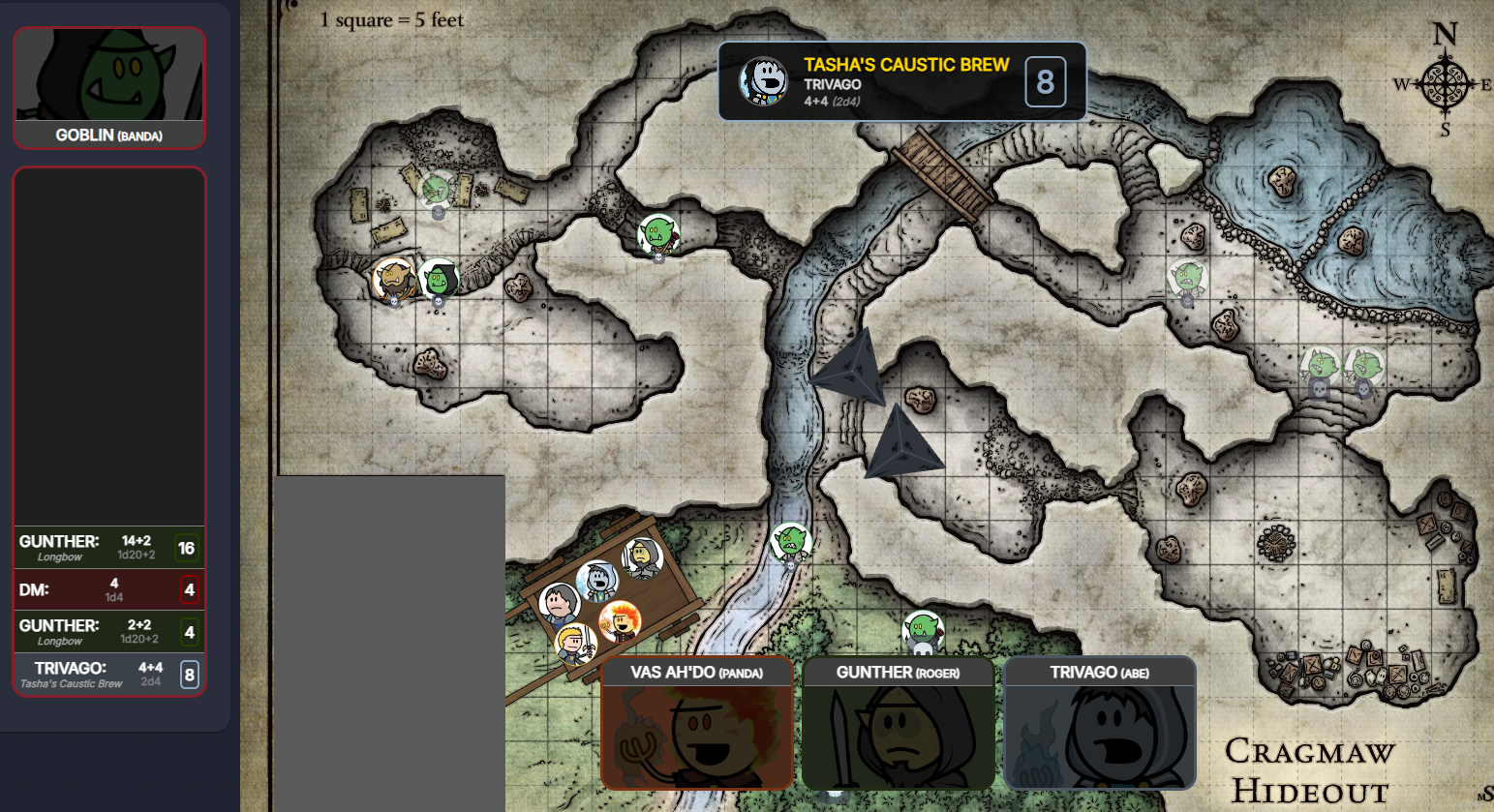
overlay-screenshot
The overlay — dice, roll alert
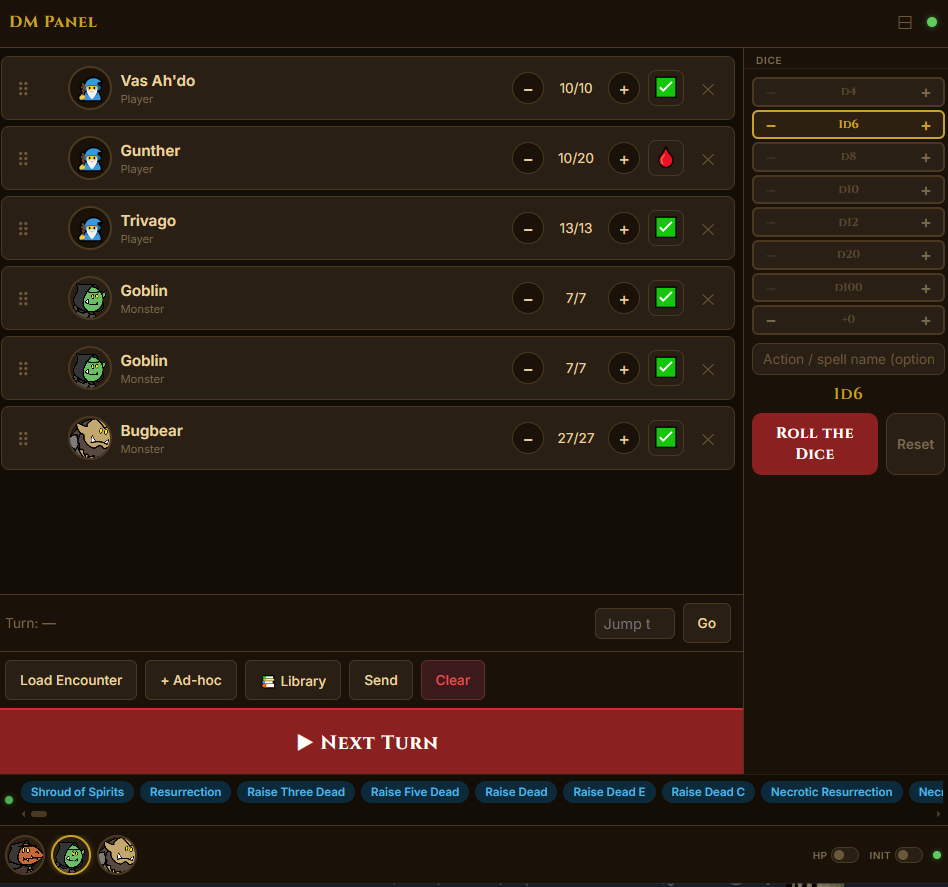
dm-ui-screenshot
DM control panel on a tablet
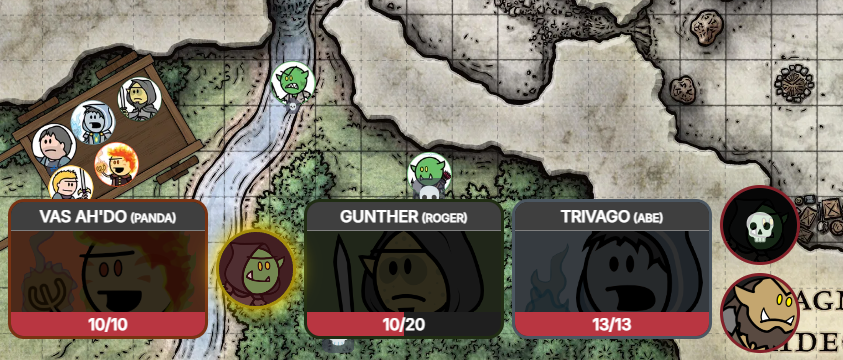
initiative-screenshot
Initiative tracker mid-combat

The Six Projects

🔌
dnd-websocket

The Hub

A Node.js WebSocket relay server. Broadcasts events, caches state, replays it to late joiners. Deployed on Render so it stays running between sessions.

Handles 3–6 concurrent clients. Could have been a shared variable. Is instead a deployed cloud service.
🎲
dnd-overlay-obr

The Overlay

An Owlbear Rodeo extension. The DM installs it into the room once; every player who joins sees it automatically with zero setup on their end. Runs a full WebGL scene with cannon-es physics to throw 3D dice. Also shows HP bars, talking indicators, roll alerts, and the initiative order.

The entire architecture exists so that tech-illiterate players see a cool dice animation without installing anything. The dice results are already known. The physics engine is for vibes.
📱
dnd-dm-web-ui

The Control Panel

A mobile-first React app for the DM. Manages personas, dice rolls, initiative order (with drag-and-drop), HP tracking, overlay toggles, and Voicemod sounds. Has a compact mode for phone use during a live session.

Built so the DM can manage a combat encounter from a tablet instead of alt-tabbing mid-session. Contains more state management than some production dashboards.
🎭
dnd-dndbeyond-listener

The Interceptors

Two Tampermonkey userscripts, both installed on the DM's browser only. Players install nothing — D&D Beyond's Game Log already delivers all player rolls to the DM's campaign page. The first script taps that. The second exists because Beyond20 has a convenient roll button on monster stat blocks, and switching to a different dice roller mid-combat was considered too much effort.

The second script exists entirely so the DM can roll Goblin initiative without moving their mouse an extra 400 pixels. This is peak laziness achieving the form of an architecture decision.
🤖
dnd-discord-bot

The Voice Bot

A Discord bot that monitors who is speaking in a voice channel and sends real-time setTalk events. Also captures a local audio device via FFmpeg and streams it into Discord — intended as a Voicemod pipe so sound effects play for everyone.

Windows-only because DirectShow. Automatically restarts the FFmpeg capture if the audio device disconnects. This was a considered engineering decision and not scope creep at all.
🎮
dnd-stream-deck-plugin

The Hardware Button

A full Elgato Stream Deck plugin with five custom actions: add dice, remove dice, reset dice, throw dice (public or private), and set DM portrait. Queues messages while disconnected and flushes on reconnect.

Pressing a physical button to roll a virtual die and display the result of a roll you could have just read off the screen. Peak content creation.

What You Need to Run This

To experience a dice roll animation in your game, please ensure you have the following:

required A D&D Beyond account with an active campaign
required An Owlbear Rodeo account
required A Discord server where you are an admin
required Node.js 18+ installed locally
required A browser with Tampermonkey installed — on the DM's machine only
required A publicly hosted URL for the OBR extension (Owlbear Rodeo cannot load localhost)
required A cloud host for the WebSocket server (or a locally exposed port)
optional An Elgato Stream Deck (any model)
optional A Voicemod license and a virtual audio cable
optional Beyond20 browser extension — DM only, for rolling from monster stat blocks
cursed A tunnel tool (ngrok, cloudflared) to expose localhost during development, OR just deploying the extension to a static host from the start — at which point you are no longer doing local development, you are doing production development, which is fine
cursed FFmpeg knowledge sufficient to debug DirectShow device enumeration on Windows
cursed The patience to explain to your players why the dice "aren't working" when the WebSocket server cold-starts on Render
cursed A deep spiritual acceptance that you could have just used Foundry
Frequently Asked Questions

What do players have to install?

Nothing. The overlay is an Owlbear Rodeo extension. The DM installs it into the room once; every player who joins sees it automatically. Players use D&D Beyond from their phones like normal. Their rolls are captured from the DM's browser without them doing anything. The entire architecture was designed around the constraint that asking a group of adults to install a browser extension before game night is an invitation for someone to show up with nothing set up. Six projects is a reasonable price to pay for never having that conversation.

Why not just use Roll20 or Foundry?

The project was already using D&D Beyond for character sheets, Owlbear Rodeo for the virtual tabletop, and Discord for voice. None of them talk to each other natively. This is the connective tissue. Switching to Foundry would mean migrating everyone's characters, relearning a VTT, and abandoning a workflow that otherwise works. Building a six-project WebSocket ecosystem was clearly the more reasonable path.

Why does the dice animation use a physics engine if the result is already known?

Because watching dice tumble is the entire point. The physics simulation is not determining anything. It is theatre. This is understood and accepted.

Why are there two D&D Beyond userscripts? And do players have to install them?

Players install nothing. Both scripts run only on the DM's browser. D&D Beyond's Game Log WebSocket delivers every player's roll to the DM's campaign page anyway — the script just taps into that. Most players use D&D Beyond from their phones; asking them to install a browser extension was not going to happen.

The second script (beyond20.js) exists for one specific reason: rolling initiative for Goblins. Beyond20 has a convenient roll button on monster stat blocks. D&D Beyond's native UI doesn't offer the same convenience mid-combat. Rather than using the deck or the web UI dice roller for that one case, it was easier to also intercept Beyond20 events. This is laziness dressed up as a feature.

Why does the Discord bot pipe audio through FFmpeg?

So that Voicemod sound effects and background music play for everyone in the voice channel, not just people watching the stream. The DM's immersive sound design is non-negotiable. Also DirectShow was the available option on Windows and this project was not going to get simpler now.

Is this overengineered?

Yes. Every component is cleanly scoped, the protocol is well-documented, the reconnection logic is solid, and the state replay on connection is genuinely useful. It is overengineered in the same way a well-maintained vintage car is overengineered: it works, it's loved, and it was definitely more effort than taking the bus.

Can I use this for my own D&D campaign?

The player roster is currently hardcoded in the overlay. The WebSocket server is shared. The Stream Deck plugin UUID belongs to the developer. You would need to fork and reconfigure several things. This is considered a personal project and not a product. You have been warned.